


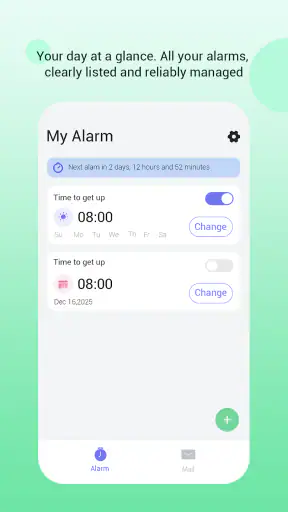
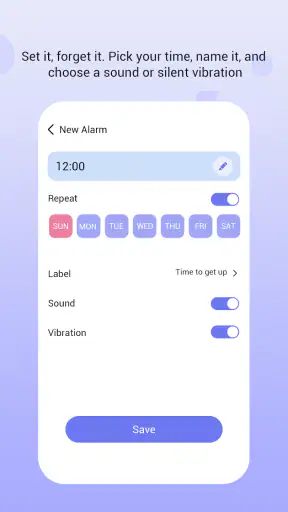
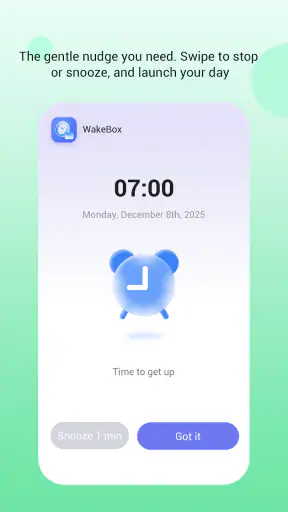
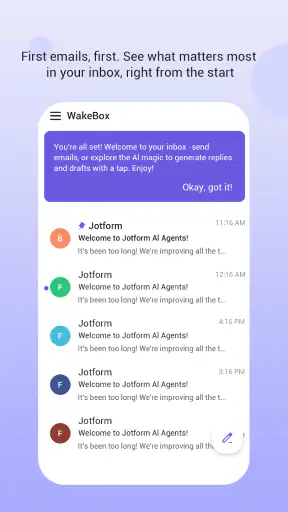
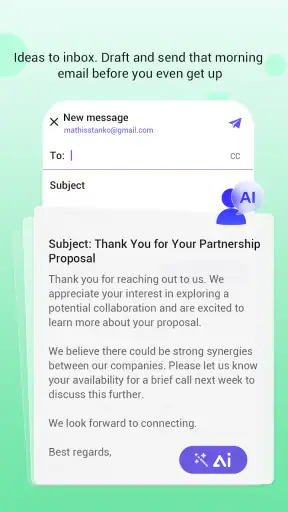
I have always found alarm apps more useful when they solve a specific problem instead of trying to become an entire lifestyle system. WakeBox takes that narrower route: it is a productivity app built around waking up reliably, with full-screen alerts and optional email access. After using it, my impression is that its value depends less on decorative extras and more on whether you need a wake-up signal that is difficult to overlook.
That distinction matters. A phone’s built-in alarm is usually enough for a simple morning schedule, while many third-party alternatives focus on sleep tracking, soothing sounds, challenges, or smart-home connections. WakeBox sits in a different space. It is aimed at the moment when an alarm must get your attention, and it adds an email-related option that may be useful when your morning routine needs a written reminder or another layer of accountability.
The app comes from BLYTHEWOOD NY LLC and is free to use. Its listing places it in the mature seventeen-plus age group, so I would not treat it as a children’s alarm without checking whether it suits the intended user. It has reached over a million installs and holds a 4.6 average from roughly sixteen hundred ratings, which suggests that the straightforward approach is resonating with a sizeable audience. I still think the right question is not whether it is popular, but whether its alert style fits the way you actually wake up.
Building a morning workflow before setting the alarm
The most useful way to approach WakeBox is to decide what should happen before opening it. An alarm can wake me, but it cannot by itself repair a chaotic evening routine, late-night screen use, or an unrealistic start time. I get better results when I first choose one clear morning action: get out of bed, take medication, join an early meeting, leave for work, or begin a study block. The alarm then becomes the trigger for that action rather than the whole plan.
For example, if I need to be online early, I would not set the alert for the exact minute the meeting begins. I would allow time to stand up, drink water, wash, and check the essentials. That small buffer changes how I judge the app. A full-screen alert is valuable when I am half asleep, but it is not a substitute for planning. WakeBox works best as the first link in a short chain that I have already made easy to follow.
This also helps avoid a common mistake: creating too many alarms for every small step. Several alerts can make a morning feel noisy and encourage me to dismiss them mechanically. I prefer one primary wake-up alert, followed by a visible physical cue such as clothes prepared the night before or a bag placed near the door. The app handles attention; the room and the routine handle follow-through.
Compared with the default clock, the appeal is the stronger presentation of the alert. Compared with sleep-focused applications, the trade-off is clear: WakeBox is more focused on dependable notification than on analyzing my night. If I want sleep stages, bedtime coaching, or a detailed sleep diary, I would look elsewhere. If I mainly need a prominent wake-up event, its focused design makes more sense.
Using the alert as a decision point
I found it helpful to define in advance what “success” means when the alert appears. It might mean putting both feet on the floor, opening the curtains, or walking to the kitchen. This sounds simple, but it prevents the familiar cycle of silencing an alarm while remaining in bed. The full-screen presentation gives the moment priority; my preselected action gives that priority direction.
There is also a practical trade-off for people who share a room. A highly noticeable alarm can help one person and disturb another. In that situation, I would think about the room, the phone’s placement, and the chosen time before relying on it every day. WakeBox’s strength is being hard to miss, so that same strength needs to be considered around partners, roommates, or sleeping children.
Capturing and organizing wake-up commitments
WakeBox is not an organizer in the broad sense of a calendar or task manager. I would use it to capture a small number of time-sensitive commitments, not to store an entire productivity system. That limitation is actually useful. When I treat every task as alarm-worthy, the alerts lose meaning. When I reserve them for moments where being awake matters, the app stays easier to trust.
The optional email access is the feature that most changes how I would use it. I would consider enabling that only when email genuinely belongs in the workflow. For instance, an early freelancer might want a written reminder connected to a morning responsibility, or someone managing a regular obligation may appreciate having an email-related step available alongside the wake-up alert. The important point is to keep the connection purposeful rather than granting access simply because the option exists.
I am cautious with any feature that touches email, even when it is optional. Before enabling it, I would read the permission request carefully and decide whether the benefit is worth adding another service to a routine that could otherwise stay local and simple. Users who want a completely self-contained alarm may prefer to leave this option unused. Users who already organize commitments through email may find it more relevant.
A useful filing habit is to separate “wake me” from “remember this.” WakeBox is suited to the first category. A calendar is usually better for appointments, a task manager for flexible work, and a notes app for information. I would not use the alarm as a replacement for those tools. Instead, I would let each tool do one job: the calendar holds the event, the task list holds preparation, and WakeBox marks the moment I must be awake to act.
This division prevents a subtle failure. If an email reminder, a calendar notification, and an alarm all arrive at the same time, I may spend the first minutes sorting alerts instead of starting the morning. I prefer to place the wake-up alert before the commitment and use the intervening time for preparation. That gives the app a clear role and reduces notification clutter.
A realistic weekday example
Imagine I have an early remote presentation. The night before, I would prepare the presentation, place the laptop where I can reach it, and decide what the first five minutes of the morning should contain. WakeBox would provide the prominent wake-up signal. If the optional email function fits my workflow, I might use it as a written prompt connected to that responsibility, but I would not depend on email alone for the actual alarm.
When the full-screen alert appears, I would leave the bed before checking messages. That order is important. Opening email first can pull me into unrelated conversations, while the alarm’s real purpose is to move me into the planned routine. After getting up, I could use the written reminder or calendar to confirm the meeting details. In this example, WakeBox is not managing the presentation; it is protecting the transition from sleep to preparation.
For rotating schedules, I would be more deliberate. A single repeating pattern may not suit changing shifts, travel, or irregular study days. I would review the next morning’s commitment before sleeping and avoid assuming that yesterday’s setting is still correct. This is one of the less glamorous but most important habits with any alarm app: the user must keep the schedule aligned with real life.
Turning one alert into a repeatable routine
The app becomes more valuable when the same response follows the alert each day. My preferred routine would be short enough to remember: silence the alert, stand up, get light into the room, drink water, and begin the first prepared task. The exact steps can vary, but the sequence should not require much thinking. A reliable alarm removes one decision; a repeatable routine removes several more.
I would also keep the phone away from the pillow but close enough for the alert to be heard and handled. That placement creates a small amount of movement without making the alarm impossible to reach. It is a better compromise than keeping the phone in bed, where the temptation to dismiss the notification and continue sleeping is strongest.
WakeBox’s full-screen presentation is particularly useful in a dark, quiet room where a small banner could disappear among other notifications. It gives the alarm visual prominence at the exact moment attention is unreliable. Still, I would not assume that a prominent screen guarantees waking. Heavy sleepers, exhausted workers, and people who sleep through sound may need a second independent method, such as a separate alarm device or a person who can check on them.
That is not a criticism unique to this app; it is a realistic boundary of phone-based alarms. The more important question is whether WakeBox adds enough visibility to improve the user’s existing setup. For someone who regularly misses ordinary notifications, it may be a meaningful upgrade. For someone who already wakes consistently with the built-in clock, the difference may feel modest.
I would review the routine after several mornings rather than changing it after one bad day. If I keep dismissing the alert, the issue may be an overly late bedtime, an alarm placed too close to the wake time, or a first task that feels unpleasant. Changing the time without examining the routine can create a cycle of increasingly early alarms without better mornings.
Keeping the system calm instead of complicated
Productivity tools often become counterproductive when they demand constant maintenance. WakeBox has an advantage here because its central job is easy to understand. I would avoid turning it into a collection of overlapping reminders. One alert for the essential wake-up moment, plus an optional email-related layer when it truly helps, is a cleaner setup than a crowded sequence of prompts.
For weekends, travel, or days off, I would check the active routine rather than assuming a repeating alarm will always be appropriate. A useful system should protect sleep when no early commitment exists. The app can be part of a sustainable schedule only if I remember that rest is also a valid reason not to trigger an alert.
The free price makes experimenting low-risk. I could try it for a normal workweek, compare it with the phone’s built-in alarm, and judge whether I actually get out of bed more consistently. That comparison should focus on behavior, not on the number of settings. If the app does not change my morning outcome, extra prominence alone may not justify keeping it in my routine.
Where the setup can fail
The first failure point is overconfidence. A full-screen alert looks more forceful than an ordinary notification, but it cannot overcome every technical or human problem. A phone that is switched off, out of power, muted in an unexpected way, or placed where its alert cannot be noticed is still a weak alarm setup. I would charge the device, keep the app configured, and test the arrangement before trusting it for an important morning.
The second failure point is permission fatigue. Optional email access may be useful, but it also introduces a decision that a basic alarm does not require. If I do not have a clear reason for using it, I would leave it alone. A productivity system should reduce uncertainty, not create a new question about which accounts or messages are involved.
The third is schedule drift. People often set an alarm once and forget that work hours, classes, appointments, and sleep patterns change. I would make checking the next day’s alarm part of my evening shutdown, especially during a week with unusual start times. That habit is more valuable than adding multiple backup alerts that I may eventually ignore.
Another limitation is that WakeBox is not the best match for users seeking a complete sleep platform. Someone who wants sleep measurements, gradual wake-up lighting, relaxation audio, or a broad health dashboard should choose an app designed around those goals. WakeBox’s focused approach means it may feel sparse to a person who expects an all-in-one wellness product.
It may also be the wrong choice for someone who dislikes strong interruptions. If I need a quiet vibration because another person is sleeping nearby, a wearable or a gentler alarm may be more suitable. Likewise, if my main problem is remembering flexible tasks during the day, a task manager will give me better organization than an alarm-centered tool.
Device compatibility is another practical consideration. The current version is 1.2.6 and supports Android 7.0 or later, so I would check the phone’s software before planning around it. That requirement is broad enough for many older Android devices, but an older phone can still behave differently from a newer one depending on battery management and notification controls. I would test the actual device rather than assuming every alert behaves identically.
The mature age classification is worth taking seriously as well. I would not install it on a child’s phone simply because it is an alarm. Parents should consider the app’s intended audience and the way email access, full-screen alerts, and morning routines fit the child’s needs. For adults, the classification is less likely to affect ordinary alarm use, but it remains part of the app’s store profile.
Who should adopt WakeBox?
I would recommend WakeBox to adults who frequently overlook standard alarms, need a visually dominant wake-up prompt, or want a simple bridge between waking and a time-sensitive responsibility. It is especially appealing when the problem is attention at the moment of waking rather than long-term scheduling. The optional email capability may also suit people whose morning commitments naturally live in their inbox.
I would be more selective for light sleepers who already wake reliably, users who want deep sleep analysis, and anyone who prefers a completely silent or wearable-based solution. Those people may gain more from the phone’s ordinary clock, a sleep-tracking platform, or dedicated hardware. The app’s value is not universal, and its focused design should be treated as a strength only when that focus matches the problem.
My advice is to start with one meaningful alarm and one prepared first action. Do not begin by connecting email, creating a complicated sequence, or replacing your calendar. After several mornings, ask whether the full-screen alert helped you get up and whether the resulting routine felt calmer or more intrusive. If it helped, add only the optional layer that serves a clear purpose.
In my experience, that is the most sustainable way to use this productivity app. It does not need to manage every part of the day. It needs to make one transition more dependable. The combination of a free entry point, a strong alert presentation, and optional email access gives it a distinct place between the basic clock and feature-heavy sleep applications. Its main weakness is equally clear: the user still has to maintain the schedule, protect the phone’s reliability, and build the habit that follows the alert.
Overall, I see WakeBox as a practical choice for people who want their morning alarm to be unmistakable without adopting a large wellness platform. The 4.6 average and million-plus install reach show that many users are finding value in that focused idea, while the mature rating, Android requirement, and email option are details worth considering before installation. I would recommend trying it as a small experiment in a larger routine, not as a promise that one alert can solve every sleep or productivity problem.


